mirror of
https://github.com/apache/superset.git
synced 2026-09-01 21:11:28 +00:00

93 lines
2.8 KiB
Plaintext
93 lines
2.8 KiB
Plaintext
---
|
|
title: Google BigQuery
|
|
hide_title: true
|
|
sidebar_position: 20
|
|
version: 1
|
|
---
|
|
|
|
## Google BigQuery
|
|
|
|
The recommended connector library for BigQuery is
|
|
[sqlalchemy-bigquery](https://github.com/googleapis/python-bigquery-sqlalchemy).
|
|
|
|
### Install BigQuery Driver
|
|
|
|
Follow the steps [here](/docs/databases/docker-add-drivers) about how to
|
|
install new database drivers when setting up Superset locally via docker compose.
|
|
|
|
```
|
|
echo "sqlalchemy-bigquery" >> ./docker/requirements-local.txt
|
|
```
|
|
|
|
### Connecting to BigQuery
|
|
|
|
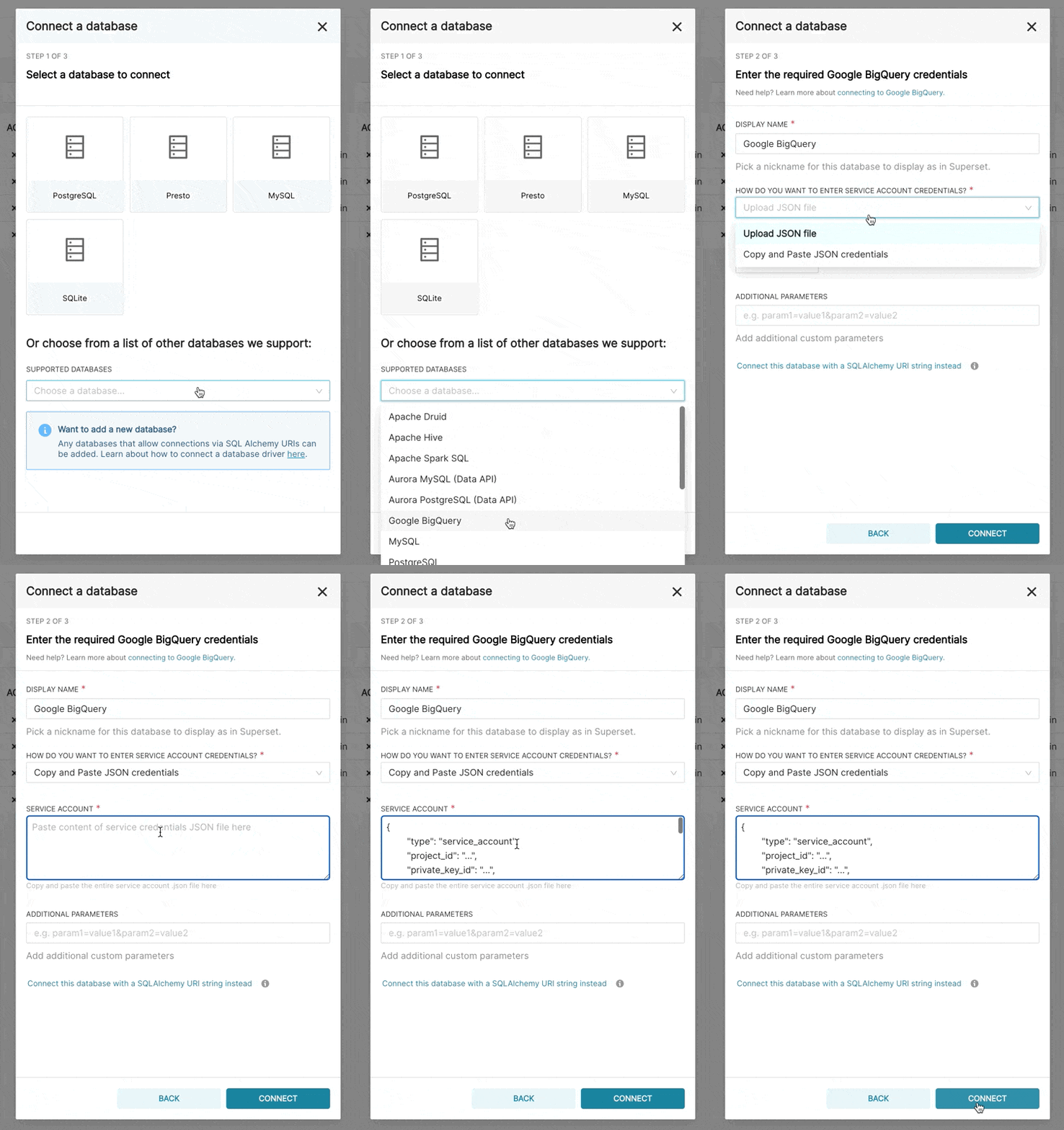
When adding a new BigQuery connection in Superset, you'll need to add the GCP Service Account
|
|
credentials file (as a JSON).
|
|
|
|
1. Create your Service Account via the Google Cloud Platform control panel, provide it access to the
|
|
appropriate BigQuery datasets, and download the JSON configuration file for the service account.
|
|
2. In Superset, you can either upload that JSON or add the JSON blob in the following format (this should be the content of your credential JSON file):
|
|
|
|
```
|
|
{
|
|
"type": "service_account",
|
|
"project_id": "...",
|
|
"private_key_id": "...",
|
|
"private_key": "...",
|
|
"client_email": "...",
|
|
"client_id": "...",
|
|
"auth_uri": "...",
|
|
"token_uri": "...",
|
|
"auth_provider_x509_cert_url": "...",
|
|
"client_x509_cert_url": "..."
|
|
}
|
|
```
|
|
|
|
|
|
|
|
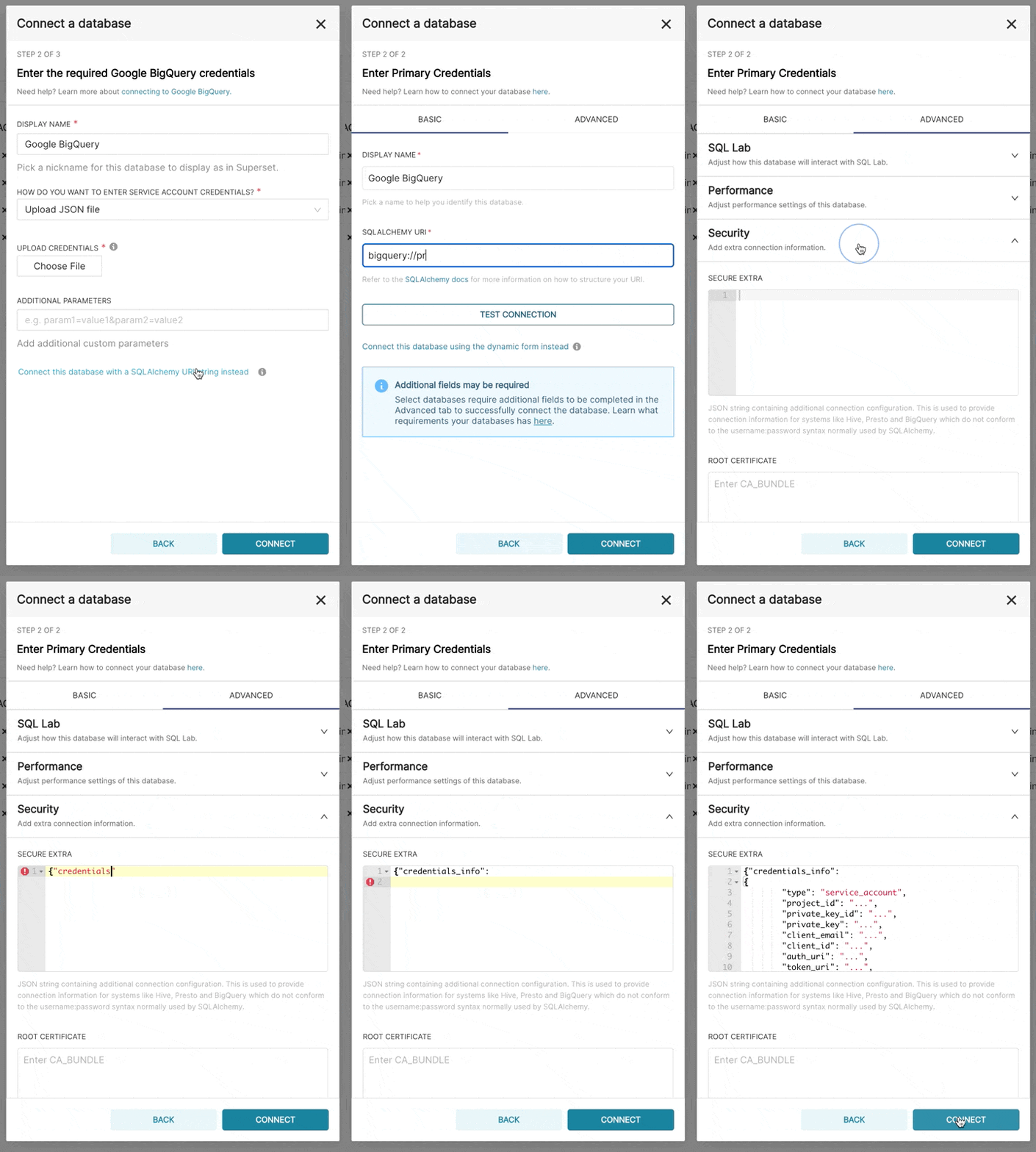
3. Additionally, can connect via SQLAlchemy URI instead
|
|
|
|
The connection string for BigQuery looks like:
|
|
|
|
```
|
|
bigquery://{project_id}
|
|
```
|
|
|
|
Go to the **Advanced** tab, Add a JSON blob to the **Secure Extra** field in the database configuration form with
|
|
the following format:
|
|
|
|
```
|
|
{
|
|
"credentials_info": <contents of credentials JSON file>
|
|
}
|
|
```
|
|
|
|
The resulting file should have this structure:
|
|
|
|
```
|
|
{
|
|
"credentials_info": {
|
|
"type": "service_account",
|
|
"project_id": "...",
|
|
"private_key_id": "...",
|
|
"private_key": "...",
|
|
"client_email": "...",
|
|
"client_id": "...",
|
|
"auth_uri": "...",
|
|
"token_uri": "...",
|
|
"auth_provider_x509_cert_url": "...",
|
|
"client_x509_cert_url": "..."
|
|
}
|
|
}
|
|
```
|
|
|
|
You should then be able to connect to your BigQuery datasets.
|
|
|
|
|
|
|
|
To be able to upload CSV or Excel files to BigQuery in Superset, you'll need to also add the
|
|
[pandas_gbq](https://github.com/pydata/pandas-gbq) library.
|
|
|
|
Currently, Google BigQuery python sdk is not compatible with `gevent`, due to some dynamic monkeypatching on python core library by `gevent`.
|
|
So, when you deploy Superset with `gunicorn` server, you have to use worker type except `gevent`.
|